
Is a Virtual Reality Headset a Good Gift for Gamers?
Immersive tech
For someone who wants to step inside a game rather than watch it on a screen, a virtual reality (VR) headset can be quite a present. Worn over the eyes, it surrounds them with a virtual world, with controllers to interact—and a little clear space needed back in the real one.

Best place to start
Our top pick for this gift idea
If you want the clearest version of this gift, start here first.
Top Pick
Meta Quest 3S 128GB HeadsetA standalone headset for someone who wants Meta Quest games and apps. The price shown is for the 128GB model; check account age rules, game purchases and the current box contents, as storage and promotional bundles vary.
See on AmazonMore options
More ways to buy this idea
If the first pick is not quite right, these alternatives keep the same overall feel.
The same Quest 3S hardware route with more storage for a larger installed library. The linked price is for 256GB; it buys capacity rather than a different lens system, and other bundles have separate contents and prices.
See on Amazon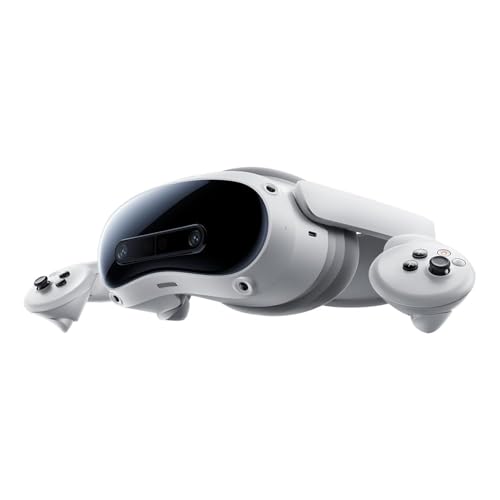
A higher-priced standalone alternative for someone who specifically wants the PICO platform, with a compatible PC-streaming route. The linked model is 256GB; check the required apps and PC setup first, and treat separately sold motion trackers as extras.
See on AmazonNeed more choice?
Browse more Virtual Reality Headset products
If none of these feels quite right, compare a wider selection at Amazon while keeping the same overall gift idea in mind.
Opens Amazon in a new tab

Amazon Prime
Get gifts delivered faster with Amazon Prime
Enjoy fast, free delivery on eligible items—including One-Day Delivery—plus Prime Video, music and reading benefits.
free for 30 days
For eligible customers. Renews into a paid membership unless cancelled. Check delivery dates before ordering.
Why people love it
Why it makes such a good gift
If someone has been talking about trying virtual reality, a headset is the sort of gift that says you’ve been listening. The device sits over their eyes, shows a computer-generated world and follows their head movements; hand controllers let them interact with supported games and apps. It can turn gaming, exploration or exercise into a very different experience. Before getting carried away with the possibilities, find out what they want to play and which platform it runs on.
A way into VR without buying a gaming PC
The featured Quest 3S and PICO 4 Ultra can run their own supported apps as standalone headsets. That makes them a simpler starting point for someone without a gaming PC, although an account, downloads and a suitable internet connection are still part of setup. “Standalone” does not mean all the games come with it, or that one platform’s purchases work in another’s store.
For PC VR, the computer matters just as much as the headset. Check its graphics requirements, the supported connection method and the games the recipient owns. If they use an ordinary laptop, check carefully before choosing the PC route; a headset alone does not supply the graphics power. PICO is worth considering when its own platform and supported PC workflow suit the person; it is not a route to Meta-exclusive software.
An existing PlayStation player may be thinking about PlayStation VR2 instead. That needs a separate check of PS5 compatibility, or the requirements and extra accessories for supported PC use. Phone holders are another, much more limited format: they are not equivalent to the standalone gaming headsets featured here.
How much room do they want for games?
The 128GB Quest 3S is the general starting point: it gets them onto the platform without automatically paying for a larger installed library. The 256GB version earns its place for someone who wants more games downloaded at once. Extra storage is useful for that job; it does not also upgrade the lenses.
At checkout, check the linked capacity and current box contents. Promotional games or subscriptions can have eligibility rules and redemption deadlines, so they are not promised here as permanent extras. Leaving some budget for the games they actually want is often more thoughtful than guessing a bundle. Fit accessories are also easier to choose after they have tried the headset.
Leave a little room for reality
VR needs a safe, clear play area. The sofa, the coffee table and the family pet have not signed up to be part of the adventure. Follow the manufacturer’s space guidance, keep other people outside the area and check which seated or standing modes are supported. If the recipient wears glasses, check the fit arrangements too.
Comfort is personal, so let the first sessions be short and follow the headset’s guidance. There is no prize for staying in longer than feels comfortable. A chance to try VR beforehand can tell you more about a person’s enthusiasm than a long list of specifications.
Buying for someone younger?
- Meta accounts: ages 10–12 use parent-managed accounts, with separate teen arrangements. Use the appropriate account rather than an adult one to get around the rules.
- PICO guidance: its manufacturer does not recommend use by children aged 12 or under, and calls for adult supervision for younger users aged 13 and over.
- The games themselves: check age ratings, online features and spending settings as well as the headset’s account rules.
- Family agreement: sort out supervision, space and account ownership before gifting. One headset recommendation does not suit every child.
A lovely surprise—or a choice to make together?
This is a substantial present, so involving the recipient is sensible if you are unsure about their games, space or preferred platform. A conversation about what they want to try can still be part of the excitement. For someone with a clear interest and the right setup, it is a gift with plenty to explore; for someone who has never shown an interest, a demonstration is a better first step than a large box on their birthday.
Keep Browsing