
Coding Robot Gifts for Kids Who Like Problem Solving
STEM play
There is a lovely moment when a child gives a robot a few instructions and watches it head off exactly as planned—or straight into the wrong corner. A coding robot makes that trial and error visible. Pick simple screen-free sequences, a ready-made obstacle activity or a build-and-program project to match how they like to play.
Best place to start
Our top pick for this gift idea
If you want the clearest version of this gift, start here first.
Top Pick
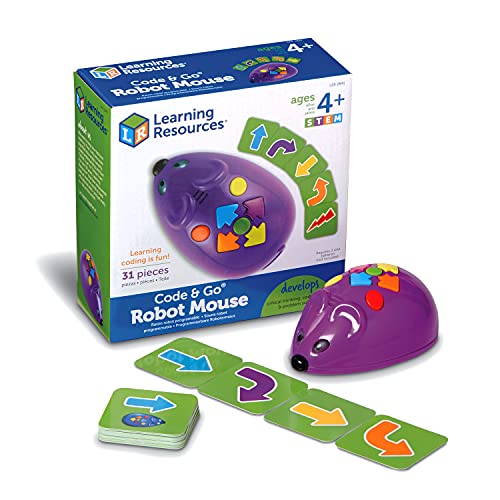
Code and Go Robot MouseA clear first step into screen-free coding for ages four and up: plan a route with the cards, then press the mouse’s buttons. This Jack mouse pack includes 30 coding cards, not the larger maze set; add three AAA batteries.
See on AmazonMore options
More ways to buy this idea
If the first pick is not quite right, these alternatives keep the same overall feel.

A screen-free activity to arrange and solve together, for ages five and up. This Botley 2.0 activity-set version includes a remote programmer, coding cards, tiles and obstacles; it needs five AAA batteries, which are not supplied.
See on Amazon
A build-and-program project for ages eight and up, using Makeblock software on a compatible computer or mobile device. It offers a route from visual blocks to Python coding; plan for assembly, setup and adult support rather than an instant remote-control toy. English assembly and programming help is available from Makeblock online; the printed instructions’ language is unconfirmed.
See on AmazonNeed more choice?
Browse more Coding Robot for Kids products
If none of these feels quite right, compare a wider selection at Amazon while keeping the same overall gift idea in mind.
Opens Amazon in a new tab

Amazon Prime
Get gifts delivered faster with Amazon Prime
Enjoy fast, free delivery on eligible items—including One-Day Delivery—plus Prime Video, music and reading benefits.
free for 30 days
For eligible customers. Renews into a paid membership unless cancelled. Check delivery dates before ordering.
Why people love it
Why it makes such a good gift
Three different starting points
Code & Go Jack Robot Mouse is the straightforward screen-free lead for ages four and up. Children plan moves with coding cards and press the buttons on the mouse. This is the mouse-and-cards pack, not the larger maze activity set: there are no maze walls or track tiles in this choice. A route laid out on the floor can be enough to get started, with three AAA batteries added by the buyer.
Botley 2.0’s activity set suits ages five and up and supplies tiles and obstacle pieces as well as the robot and remote programmer. The child sends a sequence from the programmer; no tablet or app is needed. It is the more complete screen-free activity gift if you want something to arrange and solve together. Have five AAA batteries ready; they are not included.
Makeblock mBot2 is the build-first route for ages eight and up. It is assembled from parts and then programmed using Makeblock’s software. Block-based coding lets children arrange instructions visually; Python is the text-based language they can explore later. Plan for a compatible computer or mobile device, software setup and adult help, rather than expecting every child to unwrap it and work alone.
Make the first challenge achievable
Start with a short route and change one instruction at a time. The fun is working out why the robot did what it did; getting it wrong is part of the activity, not evidence that the child is ‘bad at coding’. Choose for their current patience and interest, with room for another challenge when they want it.
- Check the marked age and small-parts warnings on the exact pack; these are not toddler toys.
- Choose the activity-set version of Botley when the supplied obstacles matter. The smaller robot pack has different contents.
- For mBot2, check current device/software compatibility and allow time for the adult to help with assembly and the first connection.
If the making is the main attraction, a 3D puzzle model kit offers a building project without the programming step. A coding robot earns its place when the child will enjoy changing the instructions as much as watching it move.
For mBot2, Makeblock provides English assembly instructions and first-program guidance online. Check that the recipient can use these before buying; the language of the printed instructions in the linked pack is not confirmed.
Keep Browsing