
Digital Drawing Tablet Gifts for Creative Work
Digital art
For someone who fills every notebook margin with drawings, a graphics tablet gives their next idea somewhere new to go. They draw with a pen on a separate pad, while their picture takes shape on the computer screen.

Best place to start
Our top pick for this gift idea
If you want the clearest version of this gift, start here first.
Top Pick
GAOMON S620 Graphics TabletA screenless pad with a 6.5 × 4-inch active drawing area and four shortcut keys. Needs a compatible device and driver; a compact choice for drawing beside a computer.
See on AmazonMore options
More ways to buy this idea
If the first pick is not quite right, these alternatives keep the same overall feel.
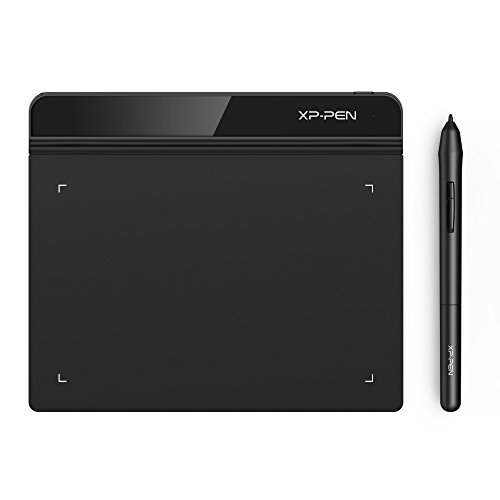
A slim screenless pad with a 6 × 4-inch active area and a battery-free pen. Choose for a simple compact setup and check the exact device, driver and cable requirements.
See on Amazon
A larger screenless pad with a 10 × 6-inch active area and eight shortcut keys. Needs desk room, compatible hardware and the right driver; it is not a standalone computer or pen display.
See on AmazonNeed more choice?
Browse more Digital Drawing Tablet products
If none of these feels quite right, compare a wider selection at Amazon while keeping the same overall gift idea in mind.
Opens Amazon in a new tab

Amazon Prime
Get gifts delivered faster with Amazon Prime
Enjoy fast, free delivery on eligible items—including One-Day Delivery—plus Prime Video, music and reading benefits.
free for 30 days
For eligible customers. Renews into a paid membership unless cancelled. Check delivery dates before ordering.
Why people love it
Why it makes such a good gift
A graphics tablet can be an inviting next step for someone who enjoys sketching and wants to try digital art. Looking at the computer while drawing on the pad takes a little getting used to, so a willingness to experiment matters more than being an accomplished artist already.
They may already have a drawing surface in their bag: an iPad with a compatible Apple Pencil, or another tablet with suitable pen and app support. Check what they own before adding a separate pad. For someone who’d rather draw straight on the screen, explore our tablet gift ideas and match the pen support and apps to their creative plans.
Choose the working space first
GAOMON’s S620 has a 6.5 × 4-inch active area and four customisable shortcut keys. It keeps the footprint modest while giving the artist buttons for commands they use often. It is a sensible starting point for someone drawing beside a laptop, provided their device and software work with the current S620 driver.
XPPen’s Star G640 has a slightly smaller 6 × 4-inch active area and a battery-free pen. Its attraction is the simple, slim pad rather than a bank of tablet buttons. It suits someone who is content to use keyboard shortcuts and wants a small surface for drawing, notes or a game that supports pen input.
UGEE’s M708 V3 gives more room for the hand to move, with a 10 × 6-inch active area and eight shortcut keys. The larger surface is useful when the recipient wants broader strokes, but it also occupies more of the desk. Those active-area measurements describe the space for drawing; allow a little more desk room for the pad itself.
Check the setup they already use
These pads work with a separate compatible device and drawing software. The pen is supplied, while any paid art programme is a separate choice.
- The manufacturer’s current driver needs to support their operating system and chosen art programme.
- A computer with only USB-C connections may need an adapter for the supplied cable.
- Spare pen nibs and a holder are useful package details. For a school or work computer, make sure they can install the driver.
Choose S620 for a small pad with useful shortcut keys, G640 for a simpler compact surface, or M708 V3 for more drawing room. Their existing creative habits matter more than the biggest specification number. For someone happier making with paper and pencils, the adult colouring sets offer a screen-free alternative with materials included.
Keep Browsing