
Gaming Console Gifts: Choose the Right Platform
Gaming platforms
Buying a games console for a child, teenager or partner starts with the games they actually want to play. Compare Nintendo, PlayStation and Xbox by their existing library, friends, handheld or TV use, and whether they want physical games or downloads.

Best place to start
Our top pick for this gift idea
If you want the clearest version of this gift, start here first.
Top Pick
Nintendo Switch 2 ConsoleThe starting choice for a gamer who wants both handheld and television play. This link is the console-only package, with no game included; game bundles are separate purchases with different prices. Check their wanted games, online subscription needs and existing Nintendo library before buying.
See on AmazonMore options
More ways to buy this idea
If the first pick is not quite right, these alternatives keep the same overall feel.

A television-based alternative for someone whose games and friends are on PlayStation. The linked 825GB Digital Edition has no built-in disc drive; games are downloaded, and an account and internet connection are needed. ASTRO’s Playroom is pre-installed; other games, extra accessories and subscriptions may cost more.
See on Amazon
A compact, all-digital Xbox option for someone who wants that game library and has a television or monitor. The linked model has 512GB storage and does not play game discs. The 1TB model is a separate capacity choice; games and any Game Pass subscription are additional purchases.
See on Amazon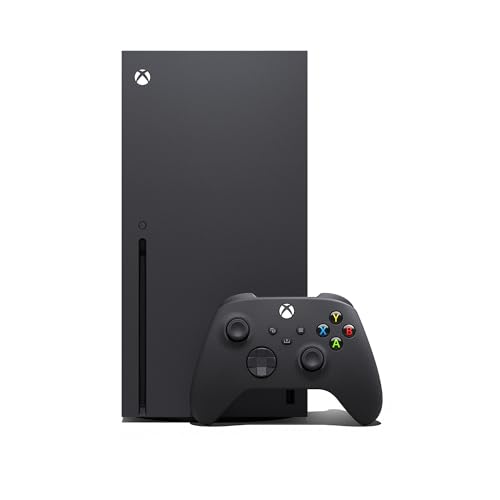
The black 1TB Series X with a disc drive for physical games as well as downloads. This is the linked new-packaging version with a controller, HDMI and power cables; games and Game Pass are separate. Other Series X editions include digital-only models, so keep the drive and capacity explicit.
See on Amazon
An original-generation Switch for its existing game library, with handheld and TV play. The linked Neon Blue/Neon Red version is one colour option; other finishes exist and stock/prices differ. It does not play Switch 2-only games. Check the exact game, bundle and UK power contents before buying.
See on Amazon
A handheld-only original Switch for games that support handheld mode; it cannot connect to a TV or play Switch 2-only games. The shown Yellow version is one colour in the range, with price and availability specific to that option. Check UK contents, game compatibility and dispatch before buying.
See on AmazonNeed more choice?
Browse more Gaming Console products
If none of these feels quite right, compare a wider selection at Amazon while keeping the same overall gift idea in mind.
Opens Amazon in a new tab

Amazon Prime
Get gifts delivered faster with Amazon Prime
Enjoy fast, free delivery on eligible items—including One-Day Delivery—plus Prime Video, music and reading benefits.
free for 30 days
For eligible customers. Renews into a paid membership unless cancelled. Check delivery dates before ordering.
Why people love it
Why it makes such a good gift
A games console can be the present someone has been hoping for, whether it is for a birthday, Christmas or a shared family purchase. It can provide solo adventures, games together on the sofa and a way to join friends online. The important first step is finding out which experience the recipient wants: a well-chosen console is personal, while a costly machine on the wrong platform can be a disappointment.
Start with the games and people, then choose the hardware. Ask for two or three game names and find out what their friends or household already use. A parent buying a first console and a partner buying an upgrade face different decisions. You do not need to understand every specification, but you do need the exact platform and edition.
Nintendo: choose between Switch 2, OLED and Lite
The Nintendo Switch 2 is the starting point here for a new Nintendo gift: it works as a handheld and with a television, and it supports Switch 2 games as well as compatible original Switch games. Compatibility is not universal, so check important older titles individually. A specific wish for Mario Kart World, for example, means Switch 2; buying an original Switch model will not meet that wish.
The Switch OLED is a previous-generation alternative for someone who wants the original Switch library, a built-in OLED screen and TV play. OLED describes the screen technology, not a newer console generation. It does not play Switch 2-only games. Consider it deliberately for those existing games and the recipient’s preferences, rather than mistaking it for Switch 2 with a different display.
Switch Lite is also part of the original Switch family, but it is handheld-only: it cannot connect to a television. It makes sense for someone who wants their own portable system and whose chosen games support handheld mode. Its built-in controls are different from the detachable controllers on the larger models; certain games or features need separate controllers and additional setup. The linked Yellow version is an example colour, not the only colour in the model range.
PlayStation: decide about discs before buying
The featured PS5 Digital Edition is for downloaded games and has no disc drive in the linked 825GB configuration. It suits someone happy to manage purchases through PlayStation Store. If they have boxed PS4 or PS5 games, want to borrow physical games, or expect a wrapped game disc alongside the console, a digital-only purchase needs careful thought.
The PS5 with a disc drive is another main option to compare. If physical games matter, compare this edition before choosing the featured Digital Edition. Check a UK retailer’s current new-console offer, exact disc-drive contents and delivery; there is no featured price for the disc edition here. A compatible separately sold drive is an option for supported digital models, but check compatibility and setup rather than assuming any PS5 drive fits any console.
PS5 Pro is a more specialised upgrade to discuss with an enthusiast, particularly around their television and the games they play. It is not an automatic requirement for a first PlayStation gift. Compare its total cost and separately required extras before treating the higher specification as the thoughtful choice. The standard PS5 routes deserve consideration first unless the recipient has asked for the Pro.
Xbox: Series S or the right Series X edition?
The featured Xbox Series S is the 512GB download-only model. There is no slot for game discs. The smaller storage figure matters when someone wants several large games installed, so compare the available storage versions and the cost of any expansion rather than choosing by the console’s appearance alone.
The featured black 1TB Xbox Series X is the disc-drive route, with greater hardware capability for a suitable display. The Series X family also includes an all-digital version: “Series X” by itself does not guarantee a disc drive. Check the exact edition, capacity and box contents before buying for someone with physical games. Higher-resolution features depend on the game and display; a new television is not something to add automatically.
Xbox Game Pass is an optional paid subscription, not a permanent library included simply because you bought a console. Check the plan, supported games, renewal terms and what the recipient already owns. Downloading a game through a subscription is different from buying a copy to keep, and catalogues can change.
For parents: make the choice usable and manageable
A family console should match the child’s interests and the household’s rules. A Nintendo system is not automatically right for every younger child, and a PlayStation or Xbox is not automatically unsuitable: the games, online features and settings determine much of the experience.
- Check each game’s PEGI age rating and content descriptors. A familiar-looking character or popular title is not enough to establish suitability.
- Create the appropriate child account and review the platform’s parental controls for purchases, communication, privacy and play time.
- Ask how friends play together. Some games support play across platforms and others have restrictions; check the specific game rather than promising they can join everyone.
- Allow for downloads, updates and account setup. If you set up the gift in advance, keep the recipient’s existing account and save-transfer needs in mind, and avoid opening a sealed surprise without considering return arrangements.
Budget for the complete present
Check whether the listing is console-only or a bundle, and whether a bundled game is a physical copy or a download code. The featured Switch 2 is console-only; do not assume Mario Kart World is included. ASTRO’s PLAYROOM is pre-installed on the featured PS5, but that does not turn it into a bundle containing every game on the wishlist.
A second controller may be worthwhile for games together, while a case can be more useful for a portable player. Check what is supplied before adding accessories. Some online play requires a paid membership, but requirements vary by platform and game; recurring subscriptions, storage and game purchases belong in the total budget.
For a partner who already plays regularly, ask about their current library and any intended transfer before switching platforms. For a PC-games enthusiast who mainly wants portability, the separate handheld gaming console idea may be more relevant. For someone who wants short sessions of older games rather than a current console library, explore retro gaming consoles.
The safest final check is simple: write down the exact console, the game they most want, the way they will play and the extras needed on day one. When those fit together, you can choose confidently without chasing the longest specification list or assuming every console suits the same person.
Keep Browsing